


Weather Navigation
2.726.00 Reviews
App Specs
- Version
- Varies with Device
- Updated On
- License
- Free
- Downloads
- 50,000+
- Developer
- byss mobile
- Categories
- Maps & Navigation
- Platform
- Android
Screenshots
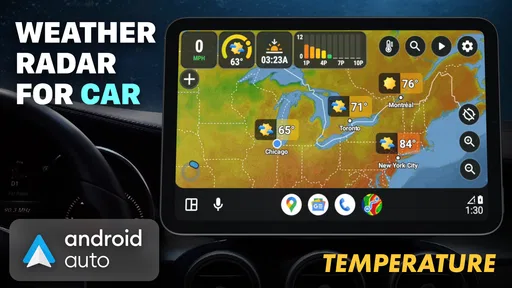
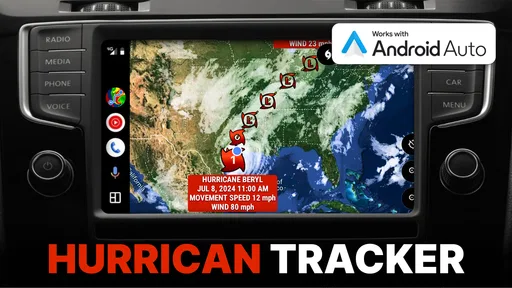
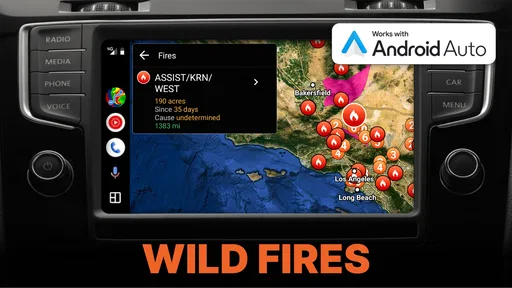
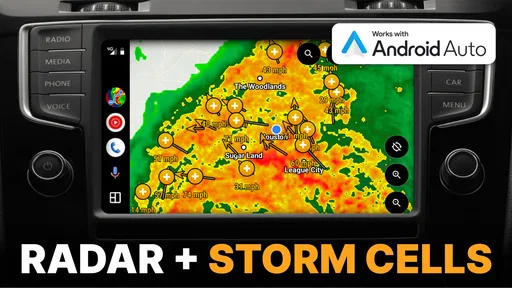
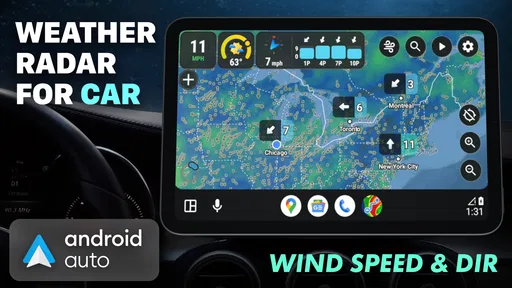
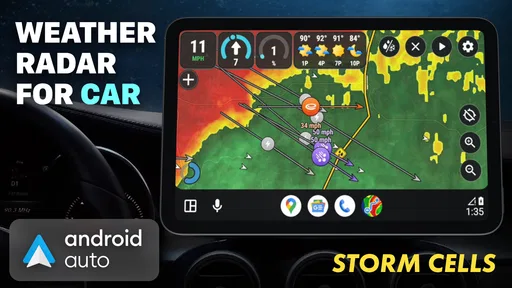
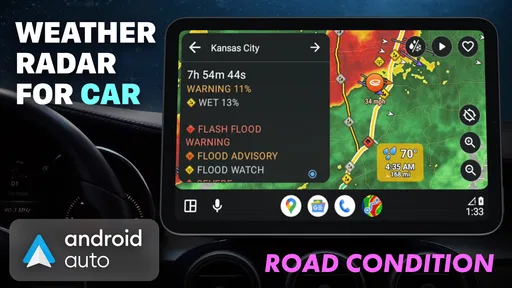
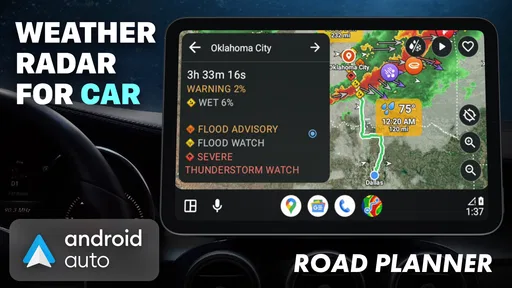
 Analysis by AppCompare
I usually think about weather at the point when it can still change a plan: before leaving for work, loading the car, or setting out on a longer drive. That is the practical idea behind Weather Navigation: it is a free Maps & Navigation app from byss mobile that brings weather awareness into the route-planning decision. Its focus is less on replacing every tool on your phone and more on helping you consider rain, road conditions, and storm activity before you commit to a journey.
Start with the trip, not just the forecast
For a short trip across town, a standard weather app may be enough. The value of a route-focused weather tool becomes clearer when the destination is far away, the drive crosses changing conditions, or the timing matters. I would check the route before leaving, then use the weather picture as one more reason to adjust departure time, choose a different road, or postpone a nonessential trip.
A useful habit is to separate two questions: “What is the weather where I am?” and “What might I encounter between here and there?” A local forecast answers the first; Weather Navigation is intended to help with the second. That distinction is especially useful when a clear sky at home gives no reliable clue about conditions farther along the road.
Reading weather information along the way
The app’s purpose is to put live weather context beside navigation decisions, with rain radar, road conditions, and storm cells as its central subjects. I would treat those layers as a planning aid rather than a guarantee that a route will be safe or free of delays. Radar can help you notice a pattern worth investigating, but it does not replace posted warnings, road closures, or your own judgement behind the wheel.
For a practical check, look at the whole journey rather than concentrating only on the destination. A storm that is not over your starting point may still matter if it sits across the route. If the display suggests a weather problem, pause somewhere safe and compare your options before driving on; do not try to inspect a map while moving.
Where it fits among navigation choices
Weather Navigation makes the most sense as a companion for people who already think about conditions when choosing when or where to travel. It can add a weather-first perspective to ordinary route planning, while a conventional navigation app remains the more natural choice if your main need is turn-by-turn directions. A dedicated forecast app may be easier for checking hourly conditions at one place, but it may not put the route itself at the centre of the decision.
I would not rely on any single screen to settle a difficult travel call. Use the app to spot potential trouble, then check relevant local travel advice and make the conservative choice when visibility, flooding, or severe weather is a concern. That workflow keeps the app useful without asking it to do the job of an official alert service or a driver’s own attention.
Worth Reading Before You Choose

EA SPORTS FC Mobile 26 Is a Bigger Football Game, but It Takes Time

Flipboard Shows What News Apps Must Do Beyond the Feed

Switching to Android Auto Means Rethinking Your Driving Routine

Google Calendar Makes a Crowded Week Easier to Manage

Ludo King Makes the Most of the Minutes Between Plans

Baby Panda World Brings Quick Play to Modern Phones, but Its Game Library Feels Busy
Who is likely to get the most from it
This approach is a good fit for regular drivers, people planning road trips, and anyone whose schedule gives them some flexibility to leave earlier or wait out a passing system. It can also help when you are deciding whether an outdoor plan involving a drive is worth keeping. If you only need a quick temperature check, or you rarely travel beyond your immediate area, the weather app already on your phone may be simpler.
Weather Navigation is rated for Everyone and is free to install, with in-app purchases ranging from $7.99 to $69.99 per item. It has reached over 50,000 installs and has an average rating of 2.8 from 82 ratings, alongside 21 written reviews. It was released on July 19, 2024. Those figures suggest a modest audience and mixed reception, so I would try the free experience before considering any purchase rather than assuming the paid options are necessary for your needs.
A realistic routine and a few sensible checks
Imagine leaving for a weekend visit when the forecast near home looks calm. Before packing, I would enter the journey in the app and look for rain or storm activity along the route, not just at the destination. If conditions appear unsettled, I would compare a later departure or another route, then check again before setting off. The important benefit is the extra decision point: a chance to reconsider while changing plans is still easy.
There are a few ways to make that check more useful. Look at the route at the time you expect to travel, because weather changes and an earlier glance can become stale. Recheck before the return trip rather than assuming the outward journey tells you what the day will bring. And if a route crosses several areas, interpret the map as a broad picture, not a precise promise about the weather at every mile.
What to expect from the experience
Weather information is only helpful when it is clear enough to act on. A route view can make a moving weather system easier to relate to your plans than a list of forecasts for separate towns, but it can also introduce another screen to consult. If you already use a navigation app and a trusted weather source, this app’s appeal depends on whether combining weather with the route saves you effort instead of adding a repeated check.
The low average rating is worth taking seriously, though it does not explain which parts users found frustrating. I would approach the app with modest expectations: test the route-weather workflow on an ordinary journey first, see whether its information is easy for you to interpret, and keep your usual navigation option available. That gives you a fair sense of whether it improves your decisions without making it your only source of guidance.
My overall view is that Weather Navigation has a specific, worthwhile purpose: helping you think about the weather as part of a journey rather than as a separate glance at the sky. It is most useful when a route is long enough, or conditions uncertain enough, that checking along the way could change your plan. For simple local forecasts, a familiar weather app may be quicker; for directions alone, a standard navigation app is the clearer choice. If you travel by road and want weather to factor into the decision before you leave, trying the free app is a reasonable place to start.
Have you ever found yourself peering out the window, trying to predict if you’ll need an umbrella or sunglasses? Well, those days are over with the Weather Navigation app. This nifty tool is like having a personal meteorologist right in your pocket. So, let’s dive into what makes this app a must-have for your daily routine.
Easy Setup and User-Friendly Interface
First things first, getting started with Weather Navigation is a breeze. Once you download the app, you’re greeted with a sleek design that’s easy on the eyes and even easier to use. The layout is intuitive, with large icons and clear labels that guide you through the setup process without a hitch. Seriously, even your grandma could navigate this app without calling you for tech support!
The home screen presents a detailed overview of your local weather, including temperature, precipitation, and wind speed. You can also swipe to view the forecast for the next week. It’s like having a crystal ball that’s always accurate, thanks to real-time updates.
Features That Stand Out
One of the standout features is the radar map. This isn’t just any map; it’s a live, interactive radar that shows weather patterns in real-time. You can zoom in and out to see how storms are moving across your area. It’s like watching a weather channel but without the annoying commercials.
Another cool feature is the alert system. You can customize alerts for severe weather conditions, so you’re never caught off guard by sudden changes. Whether it’s a thunderstorm or a heatwave, you’ll get a heads-up. Plus, the app’s AI learns your preferences over time, making the alerts more tailored to your needs.
Navigation for the Adventurous
If you’re the adventurous type who loves hiking or road trips, you’ll love the route planning feature. This allows you to check weather conditions along your planned route. It’s like having a weather-savvy co-pilot who helps you avoid nasty surprises. Planning a trip has never been this stress-free!
The app also integrates with your calendar, so you can see weather forecasts for specific events. Got a picnic scheduled? Check the app to make sure the weather won’t rain on your parade.
Why It’s Worth the Download
Let’s be real, weather apps aren’t exactly the most exciting thing on your phone, but Weather Navigation changes the game. Its combination of accuracy, real-time updates, and an array of features makes it more than just a weather app. It’s a comprehensive tool that helps you plan your day with confidence.
Plus, the app is light on data usage, so you won’t have to worry about it draining your battery or eating up your data plan. It’s efficient and effective, which is exactly what you need in a weather app.
The Final Word
In the end, Weather Navigation is more than just an app; it’s a personal assistant that keeps you informed and prepared. Whether you’re a homebody or an adventurer, this app is tailored to fit your lifestyle. So why stick with the basic weather app that came with your phone when you can upgrade to something that truly has your back?
Download it today and say goodbye to weather-related surprises. Trust me, once you try it, you’ll wonder how you ever lived without it!
Pros
- Intuitive interface for easy navigation
- Detailed forecasts with hourly updates
- Customizable weather alerts
- Integrated radar for real-time tracking
- Minimal battery consumption
Cons
- Ads can be intrusive at times
- Limited offline functionality
- Requires constant internet connection
- Advanced features need subscription
- Occasional lag in data updates
FAQs for Weather Navigation
What features does Weather Navigation offer?
Weather Navigation provides real-time weather updates, detailed forecasts, and navigation assistance tailored to weather conditions. Users can access radar maps, severe weather alerts, and route planning to avoid adverse weather. Additionally, it offers customizable notifications and integrates with various smart devices for seamless connectivity.
Is Weather Navigation available for both Android and iOS?
Yes, Weather Navigation is available for download on both Android and iOS platforms. Users can find the app on the Google Play Store for Android devices and the Apple App Store for iOS devices. Ensure your device meets the app's system requirements for optimal performance.
Does Weather Navigation require an internet connection to function?
Weather Navigation requires an internet connection for real-time data, including weather updates and map navigation. However, users can download offline maps and pre-load weather data for use when a stable connection is unavailable, ensuring reliable service even in remote areas.
How does Weather Navigation handle privacy and data security?
Weather Navigation prioritizes user privacy by employing strict data encryption and secure servers to protect personal information. The app only collects essential data to enhance user experience and complies with global privacy regulations. Users can customize privacy settings to control data sharing preferences.
Are there any in-app purchases or subscription fees?
Weather Navigation offers a free version with essential features. For advanced features like ad-free experience, extended forecasts, and premium support, users can opt for a subscription. The app offers various plans, allowing users to choose based on their needs and budget.


